Generating WFX files from other computational software output#
Many different versions of computational software for electronic structure calculations are in use. Should you wish to run AIM calculations, but may not have wfx files as the output of this software, aiida-aimall provides functionality to generate wfx files from some output and automatically run AIM calculations on the outputs in the
GenerateWFXToAIMWorkchain. To do this, we use the qc-iodata package of Paul Ayer’s Horton software
Supported output file formats are:
Molden
fchk
cp2k
Only Generating wfx file#
Molden files can be produced by numerous software suites such as Molpro, Orca, PSI4, Molden and Turbomole. Provided in aiida-aimall is a workchain to generate the wfx from these files and automatically create an AimqbCalculation for it. However, should one desire only the wfx file, you can run iodata-convert to convert the file locally. Should you desire the wfx file to be in the AiiDA database, the authors suggest making use of aiida-shell, as follows. You can change output.wfx in
BOTH the arguments AND outputs to match the filename you desire.
from aiida_shell import launch_shell_job
from aiida.orm import SinglefileData

in_file = SinglefileData('/path/to/your/.molden.input')
_, node = launch_shell_job(
            'iodata-convert',
            arguments='{file} output.wfx',
            nodes={"file": in_file},
            outputs=['output.wfx'],
            submit=True,
        )
Workflow for generating wfx and running AIM#
[3]:
from aiida import load_profile
from aiida.plugins import WorkflowFactory, DataFactory
from aiida.orm import load_node,load_code
from aiida.engine import submit

load_profile()
GenerateWFXToAIMWorkChain = WorkflowFactory("aimall.wfxtoaim")
AimqbParameters = DataFactory("aimall.aimqb")
# predefined Molden input file in database
single_file = load_node(114541)
aim_params = AimqbParameters({"naat": 2, "nproc": 2, "atlaprhocps": True})
aim_code = load_code("aimall@localhost")
builder = GenerateWFXToAIMWorkChain.get_builder()
builder.input_file = single_file
builder.aim_params = aim_params
builder.aim_code = aim_code
submit(builder)
[3]:
<WorkChainNode: uuid: f2dccfa8-d1b5-4f66-a193-12fd7fd605d6 (pk: 116427) (aiida.workflows:aimall.wfxtoaim)>
[4]:
from aiida.tools.visualization import Graph
graph = Graph(graph_attr={"size": "6,6!", "rankdir": "LR"})
graph = Graph(graph_attr={"rankdir": "LR"})
graph.recurse_descendants(
    116427,
    origin_style=None,
    include_process_inputs=True,
    annotate_links="both"
)
graph.graphviz
[4]:
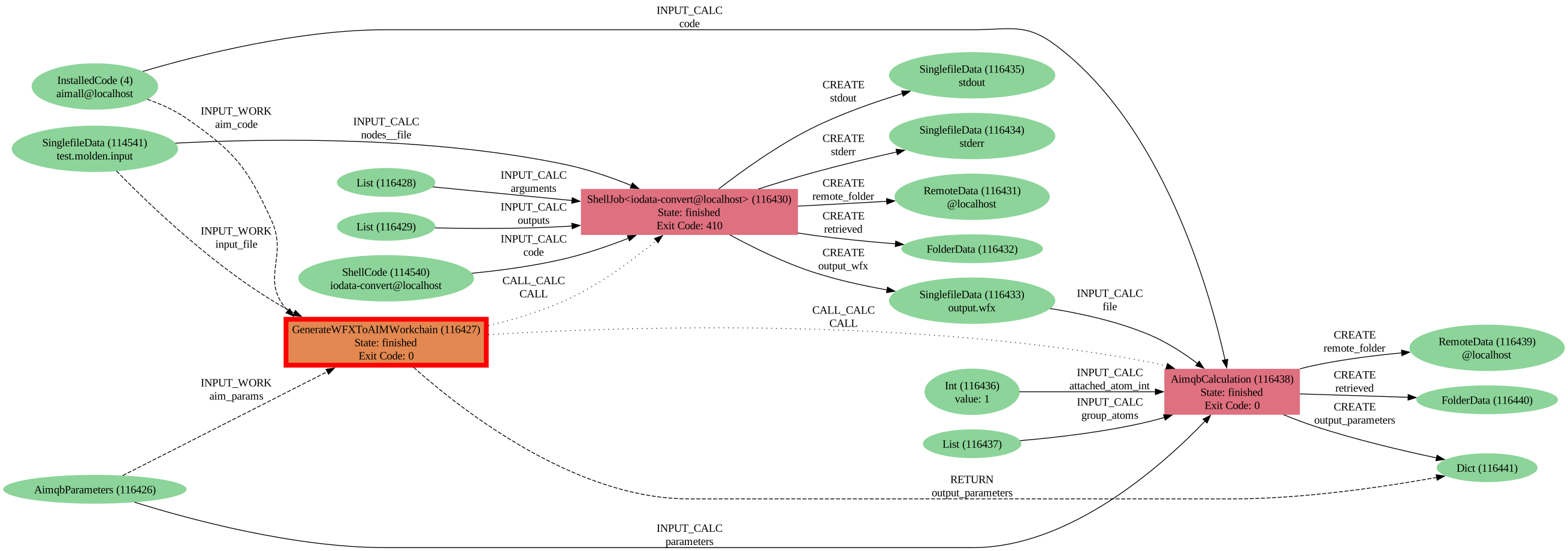
Here we can view the provenance for the AimqbCalculations generated after creating the wfx file with iodata-convert through aiida_shell. Note that in this instance the ShellJob has an exit code 410 due to some stderr being printed. The error displayed is just a notice regarding iodata-convert fixing the incorrect Molden format that was generated by Orca.